Introduction
In Free Fire, servers are also known as regions, and every region gives players a slightly different gaming experience. Some servers are famous for rare bundles, some for exclusive skins, and some for high-level pro players. In 2026, many players want to create IDs on the Brazil server, pro servers, or the best servers to collect unique bundles and demanding skins. Whether you play on mobile or PC emulator, changing servers by creating a new ID is very easy and safe. This guide will help you create another Free Fire server account smoothly, without confusion, and in the best possible way.
Why Changing Server is Important
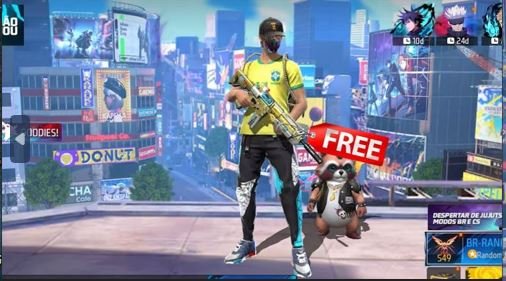
Changing your server gives you access to new events, fresh Luck Royale rewards, different top-up bonuses, and rare bundles that may not be available in your main region. Some servers release exclusive skins earlier, while others offer better discounts and free rewards. However, This makes your account more valuable, rare, and unique. Many pro players use multiple server IDs to collect limited items and enjoy different gameplay styles. In 2026, server change is one of the best methods to explore Free Fire deeply.
Is It Safe to Change Server?
Yes, it is completely safe if you create a new account for another server. Your main ID will stay untouched. The new ID will be linked to a new Gmail account and will work independently. Ping issues only happen if you keep VPN on during gameplay. Once the ID is created, you can turn off the VPN and play normally with stable internet. This method works on both mobile and PC.
Which Server is Best in Free Fire?
There is no “bad” server, but each server is famous for something special.
- India (IND) – High competition, fast matchmaking, strong ranked pushers.
- Brazil (BR) – Pro server, skilled players, rare and demanding bundles.
- Thailand (TH) – Stylish skins, frequent events.
- Vietnam (VN) – High quality bundles and aggressive gameplay.
- Indonesia (ID) – Good events and active player base.
- Singapore (SG) – Balanced gameplay and quick updates.
- Europe (EU) & North America (NA) – Stable servers with global players.
Note: Players consider the Brazil server one of the best and most pro servers in 2026 because it offers rare skins, strong competition, and rich bundle collections.
Steps By Steps To Create New Server Free Fire
Step 1: Make New Gmail
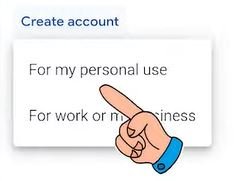
First, create one new Gmail account because Free Fire needs a fresh email to register a new ID on another server. Therefore, This Gmail will be used only for your new server account and will not affect your main Free Fire ID. You can create it easily on mobile or PC in just a few minutes. After creating, keep the email and password safe because you will need it every time you log in to this new server.
Points:
- Create one fresh Gmail
- Do not use your main ID Gmail
- Works on mobile and PC
- Needed for server change
Step 2: Download VPN
Now download any VPN to select your desired server. VPN is required only for account creation, not for gameplay. It will not cause high ping if you turn it off after login. You can use Power VPN or any other VPN you trust. The purpose is only to connect your Free Fire to another region like Brazil server, pro server, or best server in 2026.
Points:
- VPN is only for server selection
- Turn it off after login
- Any VPN works
- No permanent effect
- Servers you can choose:
List: India (IND), Brazil (BR), Thailand (TH), Vietnam (VN), Indonesia (ID), Taiwan (TW), Europe (EU), North America (NA), South America (SA), Singapore (SG)
Important: I am not explaining the step-by-step method to connect a VPN because every VPN app has its own interface and connection system. Most VPNs are very simple to use, and you can easily understand them by opening the app and following the on-screen instructions.
Link and Note: VPN (Power VPN) This is not a promotion for any VPN. Power VPN is only suggested as an example because it is free and easy to use. You are free to choose any other VPN that you like or already use. All VPNs work in a similar way for server changing in Free Fire.
Step 3: Open Free Fire and Login
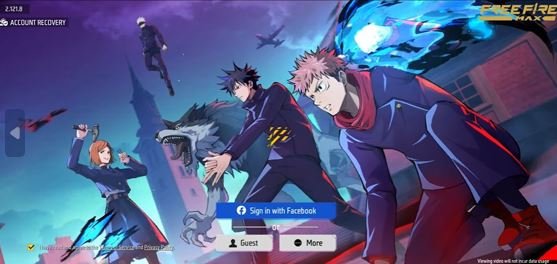
After connecting VPN, open Free Fire. It may take a little longer to load, so wait calmly. When the login screen appears, tap on “More” and select Gmail. Then login using the new Gmail you created. Your new Free Fire ID will be created automatically on the selected server.
Points:
- Open Free Fire
- Wait for login screen
- Tap “More”
- Select Gmail
- Login with new Gmail
Now you have successfully created a Free Fire ID on another server. You can turn off VPN and enjoy smooth gameplay, rare bundles, demanding skins, and a pro server experience in 2026.
Note: However, After creating a new account, you will need to set your in-game name, choose your basic profile details, and select your gaming experience level. This is a normal process for every new Free Fire ID, and it helps the game adjust matchmaking and tutorials for your play style.
Additional Tips: If you feel any high ping or network delay, simply turn off or disconnect the VPN. You only need a VPN to connect and create a new server account, not for regular gameplay. Additionally, playing without a VPN after creating your ID provides smoother performance and better stability. Now you can enjoy your new server experience freely.
Addition, you can read:
Aim Lock in Free Fire: Get Master to Perfect Headshots
Score System in Free Fire Battle Royale Ranked: Easy Explanation
Conclusion
In 2026, create another server Free Fire ID is one of the best ways to get rare skins, exclusive bundles, and experience pro servers like Brazil. This method is safe, simple, and powerful for collectors and competitive players. With a new Gmail and a VPN, you can easily access the best server, unlock unique appearances, and make your gaming profile stronger, richer, and more demanding in the Free Fire community.
Thanks for sharing superb informations. Your web-site is so cool. I am impressed by the details that you have on this web site. It reveals how nicely you perceive this subject. Bookmarked this web page, will come back for extra articles. You, my pal, ROCK! I found just the information I already searched all over the place and just could not come across. What a great website.