
Introduction
In the PUBG Mobile battle royale video game, account security plays a very important role because every player’s progress, rank, skins, achievements, and friends list are stored inside the game account. The Security Verification system is designed to confirm the identity of the real player before allowing access to important account management options in pubg mobile. Many players link their PUBG Mobile battle royale video game account with platforms such as Facebook or Apple ID so they can log in easily and play matches with friends. Because the game has millions of active players around the world, protecting accounts from unauthorized access has become necessary. The security verification feature checks device activity, login behavior, and verification codes to ensure that only the real account owner can manage account settings.
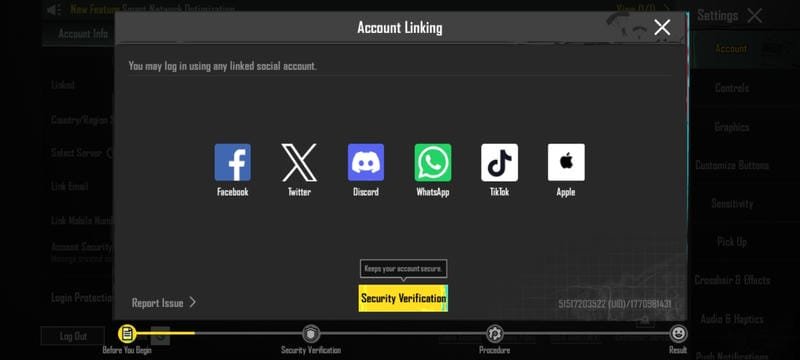
However, many players become confused when they suddenly see the security verification message while trying to link, unlink, or change their login platforms in the PUBG battle royale video game. Some players think their account has a problem, while others do not understand why the system asks for verification codes or security questions. In many cases, this happens when a player tries to manage their account from a new device, has not been active in the game for several days, or when the system detects unusual activity. Because of this confusion, many players search for clear guidance about the PUBGM Security Verification process and how to successfully complete it to access their account management features. Pubg Mobile Available Linked Social Account
Different platforms in PUBG Mobile such as:
- Twitter or X
- Discord
- TikTok
- Apple
Note: Among these platforms, Facebook and Apple are the most commonly used login methods. Many players prefer Facebook because it allows them to find and play with their Facebook friends directly inside the PUBG Mobile battle royale video game.
Why Security Verification?
Security Verification exists to confirm that the person trying to manage the account is the real owner. In the past, players could easily link or change accounts without many checks, but now the system requires confirmation to protect player accounts.
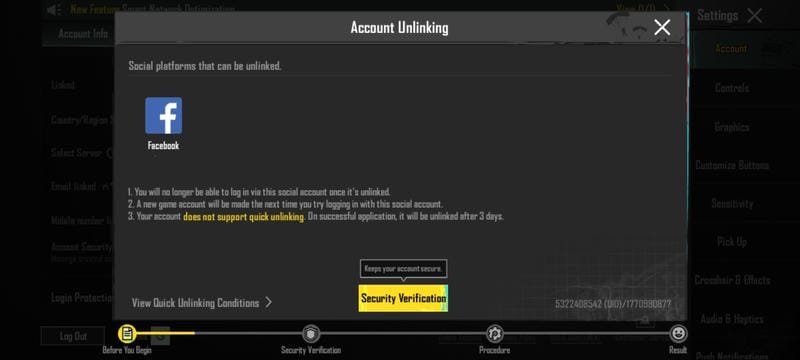
Sometimes players try to manage their account from a new device or unfamiliar location. In such cases, the PUBG Mobile battle royale video game activates the security verification system. The system asks several questions and may send a verification code to the linked email or mobile number. Only after completing this verification can the player manage account settings such as, unlinking-linking(adding), or removing login platforms to login another account.
For example, imagine a player trying to link their Facebook account from a device they have never used before. The system may consider this suspicious activity and request verification before allowing the change.
NOTE: Without completing the security verification process, players cannot manage important account settings such as linking or removing login platforms.
The verification process usually happens in four stages: before the beginning, security verification, answering questions, and receiving the final result.
Easy Guidance For Security Verification On PUBG Mobile Process
1. Enter the verification code to pass the security check
In the first stage, the system shows the social accounts that can be managed. After that, a message may appear saying that the current environment is not secure and verification is required. At this point, a verification code will be sent to the email address linked to your account.
To complete this step, tap the Obtain button and complete the captcha verification. After that, open the email account connected to your PUBG Mobile battle royale video game profile and check the inbox. You will receive a five-digit verification code. Enter that code in the verification box and confirm the process to complete the security check.
Important Note: The verification code is usually sent only if you are using your most frequently used device that has been logged into the game for at least 15 days.
2. Security Verification FAQ Answers
Very Important Note: It is strongly recommended to use your regular device that has been used to log into the PUBG Mobile battle royale video game for at least 15 days. Even if you do not play matches every day, opening the game regularly helps the system recognize your device activity.
If the device activity is not continuous, the system may not count those days properly. Therefore it is better to open the game at least once daily to maintain active records and avoid delays during verification.
i. Are you currently on your regular device?
- No, this is a non-regular device (a new or rarely used device)
- Not sure
Yes, this is my regular device
Note: Select Yes, this is my regular device if you are using the phone you normally use to play the PUBG Mobile battle royale video game.
ii. Have you shared your account with someone else?
Account sharing means allowing another person to log in to your game account.
- No, I’ve never shared my account
- Yes, I’ve shared my account
Note: Select No, I’ve never shared my account if you are the only person who uses this PUBG Mobile battle royale video game account.
iii. Did you purchase this account?
- No, this is my own account
- Yes, I purchased this account
Note: Select No, this is my own account if you created and managed the account yourself.
iv. Are you able to receive a mobile or email verification code?
- No, I haven’t linked or don’t have access to any linked phone or email
- Yes, I’m able
Note: Select Yes, I’m able if you can receive verification codes through your linked email or mobile number.
v. Have you played a lot of matches recently?
- No, I haven’t played much
- Yes, I’ve played a lot of matches
Note: Select Yes, I’ve played a lot of matches if you are an active player of the PUBG Mobile battle royale video game.
vii. Requisition Form
Sometimes the system may ask players to submit a requisition form related to their account management request. This form usually asks questions about your gameplay activity, account history, and the reason for your request.
In the message section, you can write a short explanation such as requesting permission to manage your account settings or recover access. After submitting the form, the system reviews the request before giving approval.
Note: If the information you provide matches your account activity and you continue opening the game regularly for at least 15 days, approval may be granted more easily. However, 3 days is necessary to take requisition it mean you may get in gap of 3-15 days as well.
Important Note: Always use your most frequently used device when completing the requisition process. If the device history does not match your previous login activity, the verification may fail.
Also, players who regularly play classic matches or frequently open the PUBG Mobile battle royale video game often receive automatic approval without needing to complete long forms. Even if you cannot play every day, simply opening the game once daily helps maintain active status in the system.
Addition, you can explore:
Guide To Won 100$ From Lucky Chicken Mate PUBG Mobile
List of Perfect Graphics Settings in PUBG Mobile
Conclusion
Security verification is an essential protection system that helps keep player accounts safe in the PUBG Mobile battle royale video game. By confirming device activity, gameplay behavior, and account ownership, the system ensures that only the real player can access and manage important account settings.
FAQ: About Account Management in PUBG Mobile
How to create accounts in PUBG Mobile
There are several ways to create an account in the PUBG Mobile battle royale video game. Players can use social platforms such as Facebook, Apple ID, or email to create and link accounts. Each platform can create a separate login account.
If a player has multiple email accounts, each email can be used to create a separate PUBG Mobile account. Players can also link their Facebook accounts as a login method. Guest accounts are available when starting the game, but they should later be linked to a social platform to secure progress.
Steps: Open the game settings, tap logout, select add account, and log in using another platform. This allows players to switch between accounts without losing the previous one.
Can anyone hack your PUBG Mobile account and how can you protect it?
Yes, accounts can sometimes be at risk if players do not follow proper security practices. However, players can protect their PUBG Mobile battle royale video game account by following several safety steps.
- Change your social media passwords regularly.
- Use strong and unique passwords for your login platforms.
- Reset your password if you notice suspicious activity.
- Use the verification code system through your email.
- Link two social accounts to your PUBG Mobile account for additional security.